Auto Annotation User Guide
Learn how to configure, execute, and reuse annotation templates across projects with Auto Annotation.

Overview
Auto Annotation creates multiple annotation label types by combining annotation settings with scope-based object filtering. You can define where labels are created, standardize templates, and re-execute them across files and projects.
Key Features:
- Multi-annotation setup - Configure one or more annotation rows and run selected rows together.
- Annotation settings control - Define feature, label type, style, and case-specific inputs.
- Scope and filtering - Use file scope and OneFilter-style object rules to control label locations.
- Template/profile workflow - Save and reuse standardized configurations across projects.
- Re-execution support - Recreate labels after updates while preserving relocated label positions.
Getting Started
Basic Workflow
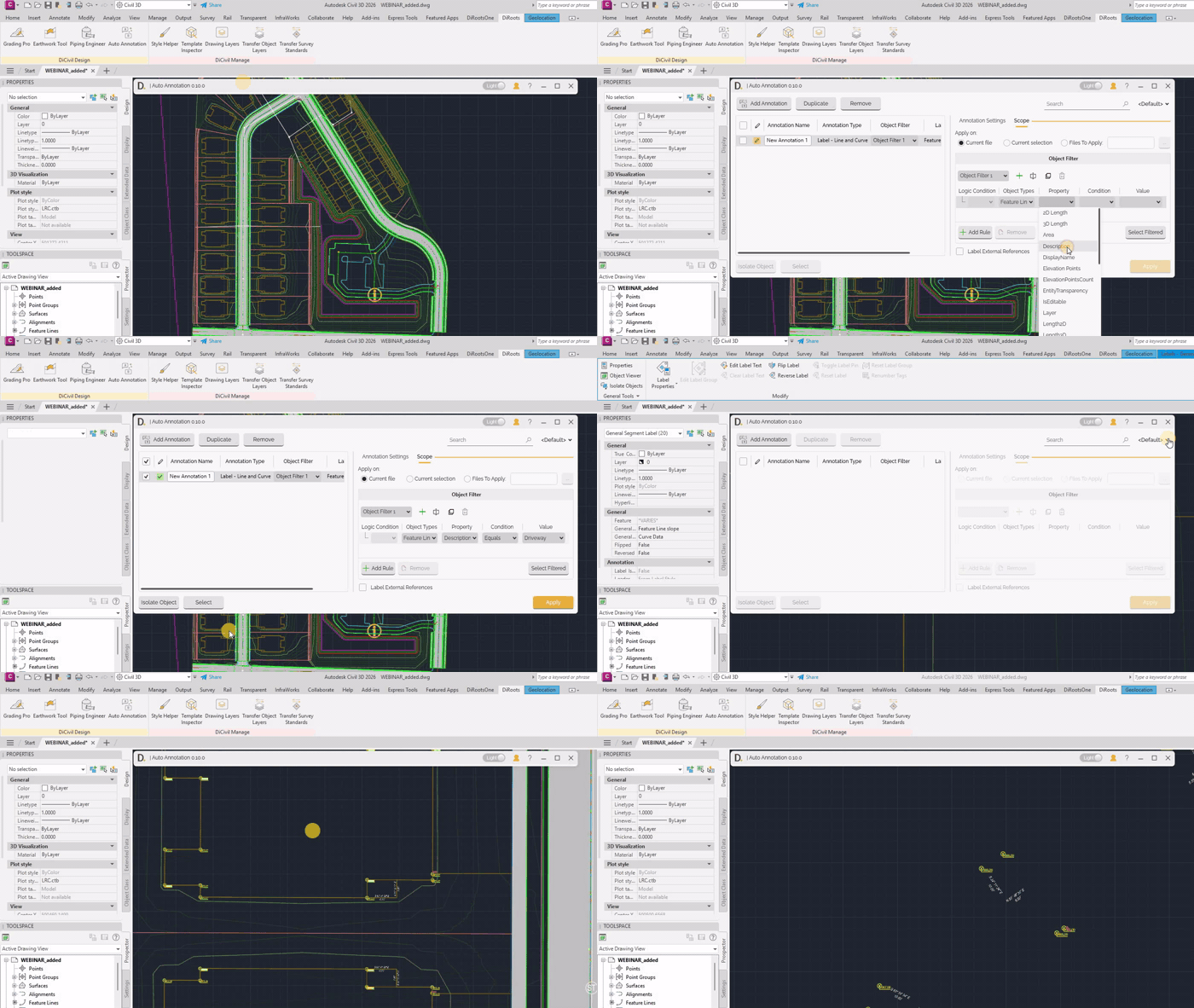
- Open Auto Annotation - Launch the tool from the DiRoots tab.
- Add Annotation Rows - Create one or more rows in the main table.
- Configure Annotation Settings - Define feature, label type, and styles per row.
- Configure Scope - Choose where to apply and define object filters.
- Check Rows to Execute - Select only the rows to create annotations.
- Apply - Run Auto Annotation on checked rows.
 Note: the version on the image may not reflect the latest version of DiCivil Package.